Tuesday, February 12, 2013

how to get a awesome new tab page in google chrome

There is a new tab page for Google chrome. It kind of looks like the Windows 8 start screen. You can pin websites you love on it. This is only for Google chrome. If you don't have Google chrome download it now : https://www.google.com/intl/en/chrome/browser/
If you do not know what Google chrome is I will tell you. It is a very safe and fast browser. More and more people are using it insed of Internet Explorer. But anyway here is the link to download the awesome new Google chrome tab page. Click here to download it. Here are some screenshots of it:


Saturday, January 12, 2013

download office 2013 preview free

The new office has came Out! your can download it free now! You have to sign in with your hotmail email here is the links http://www.microsoft.com/office/preview/en/try-office-preview
If that link dose not work click here. office 2013 is only for Windows 7 and Windows 8


Monday, November 26, 2012

How to Crate a blog

This post is about how to create a blog. There is many diffident was to create a blog. You can create  a blogger blog , a Wordpress blog, yola, and may more! All you have to have is a email. Then click resister or sign up. it will ask you a lot of questions. It will ask you questions like your email, password, username, blog title, bithdate and more. If you need any more help let me know.

 HERE is the websites to create a blog
www.blogger.com

www.yola.com

www.wordpress.com


Saturday, November 10, 2012

Windows 8 is here!

Windows 8 has final came out on October 27 2012. It is a faster better operating system. Microsoft Windows 8 is a newer way to using computers. Windows 8 haves a new start screen. It is better then the start screen on Windows XP, Windows Vista, and Windows7. Windows 8 haves apps like the Windows phone. Windows 8 haves Internet Explore 10. It haves new feachers. Windows 8 is a big hit. Micrsoft Windows haves crated a new logo for Windows 8. There is a new control panel. In Windows 8 there is a new taskbar and desktop. There is even a new boot screen!!Here are some pictures of Windows 8:


Start screen:

Windows 8 Taskbar:

Windows 8 app store


Thursday, October 11, 2012

Microsoft

When you think of Microsoft what do you think of? Most people Think of Xbox, Xbox LIVE, and Xbox 360. But Microsoft dose not just build Xbox, Xbox LIVE and Xbox 360. Microsoft builds other stuff. They help and sponsor computer companies. Like HP and Dell. They also build Microsoft Windows. Microsoft Windows is Operating system. I sure you herd of Windows XP, Windows Vista, or Windows 7. Microsoft builds phones. It is called the Windows phone.

 Here are pictures below of Microsoft


Sunday, October 7, 2012

Enbed/Disbed control panel settings

Here is the steps:

1. Click Start and then Run. Type "gpedit.msc" without quotes and press Enter.
2. In Group Policy Editor, go to Local Computer Policy -> User Configuration -> Administrative Templates -> Control Panel -> Display
 3. Locate a setting named "Prohabit accsass to the control panel". Double click to open it.
4. Select  Enable/ Disbed  and click OK.

Here is a video to help you out:


Saturday, September 8, 2012

Xfinity Wifi


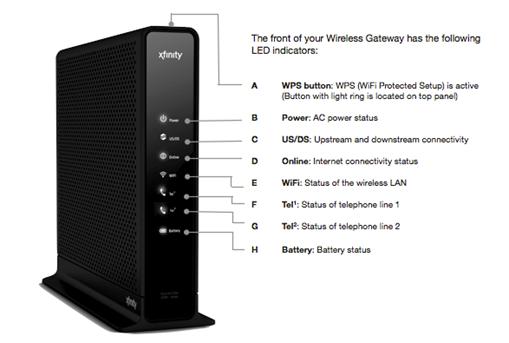
Xfinity has Wifi now!!!! If you have Xfinity call and ask for a upgrade. Ask them for the Wifi box. The cable guy will come set it up. Here is the link to the Xfinity Wifi:http://www.comcast.com/wifi/default.htm?SCRedirect=true Here is the parts of the Wifi box:

The new Windows logo

Microsoft has made a new Windows logo for Windows 8. Microsoft may changed the old logo on the other versions of Microsoft Windows. The full verson of Windows 8 will come out in October 26 2012! Here is the new Windows 8 logo:

Tuesday, June 26, 2012

The future computers build by Microsoft.

The future computers are coming! The are build by Microsoft! It is called Microsoft Surface. The Os (operating system) the Microsoft Surface will run on will be Windows 8. Watch the video blow to see more about the new computers! And look at the pictures. Here is the link to the future computers Microsoft is bulding: http://www.microsoft.com/surface/en/us/default.aspx Here is the video:

  Here is the Pictures:

Tuesday, May 22, 2012

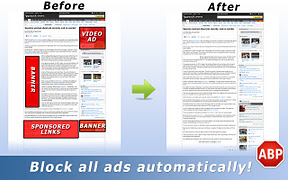
How to block ads on Chrome, Firefox, and Internet Explorer

Do you want to block those ads that are on websites? Well you can now Computers(This website Name) has recently found Awesome ad blockers to block all the ads on every website free! If you have a child how loves to play games on the computer and those game websites have inappropriate ads or ads that carry viruses or there are too much ads then you should download the ad blocker for Chrome, Firefox, or Internet Explorer. Each web browser haves it's own add blocker. It works on every website. Including Hotmail, Facebook and other websites. Just look under the the web browser name that you use below.


Google Chrome
If you use Google Chrome as your web browser do the following: Click Here to go to the ad blocker for Google chrome. Now the ads are blocked!


Firefox 
Go to the Firefox Menu and click add-ons. It should open new tab/Window. Then type inthe search box  adblocker The first Chose that comes up should be Adblock Lite 1.4.2. Click it or if it says Install on the side click Install. Then restart Firefox. Now the ads are blocked!


Internet Explorer
If you use Internet Explorer as a web browser do the following: Click here to go to the link. Then scroll down until you see the sentence Fanboy - Adblock Tracking Protection List. Click Add. Then it should install fast. Now the ads will be blocked!