PLEASE GO SUBSCRIBE TO MY FRIEND ON YOUTUBE. HE MAKES GAMING VIDEOS. FROM MINECRAFT TO CALL OF DUTY AND GRAND THEFT AUTO VIDEOS. PLEASE GO AND SUBSCRIBE TO HIM ON YOUTUBE: bit.ly/Elit3gamer180
SUBSCRIBE because ONLY the Elite SURVIVE: bit.ly/Elit3gamer180
Thursday, June 4, 2015
Thursday, March 12, 2015
Is this helpful blog gone?
I bet you are wondering if this helpful blog has came to a stop. Well yes it has. BUT I will still leave everything up this will most likely be the last blog post on this blog for years to come. Sorry. The continues blog posting has been Discontinued. In other words this blog is discontinued/ NO LONGER SUPPORTED. Like I have said I will still leave everything up and running but there will Not be anymore blog post. Thank you for visiting! And check out other blog post that are helpful to you.
BLOG HAS BEEN DISCONTINUED FOR THE MOMENT
Thursday, March 6, 2014
CenturyLink vs Xfinity
CenturyLink and Xfinity are both popular internet services. But What is the diffrance between CenturyLink and Xfinity? Well I will tell you.
CenturyLink is a lot more different than Xfinity! CenturyLink has more faster internet. Unlike Xfinity CenturyLink dose not have regular modems. If you have CenturyLink your modem has wifi bult in it. This Modem is not called a modem it is called a WiFi router. It puts out wireless internet singals to your devices. Such as Smart Phones, Iphones , laptops Tablets, ipads, Gaming caonsals that can connect to the internet and others. All you have to do is conned them to your CenturyLink Wifi.If you don't know what WiFi is it is Wireless Fidelity, wireless internet(WiFi) You can connect your devices to the internet witlessly. To use your WiFi Just simply go to your CenturyLink router. Then lift it up and look at the bottom of the router. look at the SSID. That is your WiFi name. and look at the passfrase. That is your WiFi password. No go on a device you ant to connect to the internet. Go to your WiFi settings and click the name it says on the back of your rotor. enter the password and connect. Now you are connected to your CenturyLink WiFi! Here is a video to show you how to do it:
Another difference is CenturyLink has better Pricing for good high speed internet. CenturyLink is faster than Xfinity. I compared the 2 and Xfinity loese and CenturyLink is way more faster. Event If you get CenturyLink's basic internet it is still way faster than Xfinity!
Here is CenturyLink's website: http://centurylink.net/

Here is what The CenturyLink router look:s like:

Xfinity Is a big rip off. Unless you have a lot of money for there internet and tv service don't get it. There internet is high speed but not as high speed as CenturyLink. If you get the basic package for internet service it is very slow and dose not come with WiFi. This is there basic modem for internet service:
It dose not have WiFi built in and it is slow internet. And if you want to upgrade to fast internet with WiFi it is expensive! Here is there high speed WiFi router:
But it is not as fast as CenturLink's Internet. Here is Xfinity's website: http://xfinity.comcast.net/
What internet do you chose? What internet service do you like the best CenturyLink Or Xfinity? Leve your comments down below on this blog post.
I love CenturyLink so much better!

VS

Another difference is CenturyLink has better Pricing for good high speed internet. CenturyLink is faster than Xfinity. I compared the 2 and Xfinity loese and CenturyLink is way more faster. Event If you get CenturyLink's basic internet it is still way faster than Xfinity!
Here is CenturyLink's website: http://centurylink.net/
Here is what The CenturyLink router look:s like:
What internet do you chose? What internet service do you like the best CenturyLink Or Xfinity? Leve your comments down below on this blog post.
I love CenturyLink so much better!
VS
final decision
scene Nobody comment on the last post about the blog address I have chose. It will be the same address we have now. http://jeremiah-computers.blogspot.com/
Monday, September 16, 2013
blogs and web sites
I have noties that people have been puting there blog or website in the comments. I would love to help you guys get more vews on your blog or website. Just comment on this post and I will be happy to put your blog or website on the blog and website colom on this blog. For thoses that do not know I do have a list for blogs and websites on this blog to help out. It looks like this:
Comments
I have deleted all the pending comments because there is over 300 of them and most of them are about buying stuff and stupit avertisements. So I am sorry if your comment did not get plubish.
Wednesday, September 4, 2013
New Blog address
We are now getting a new blog address. insted of using www. jeremiah-computers.blogspot.com we are using
www.computers-tecnology.blogspot.com The name will be posted when it is changed. So woran other people and friends you might know becase it will be different website address. When the name is chanege do NOT put in the web address bar www.jeremiah-computers.blogspot.com. It will NOT work. We will edit this post when it haves changed.
The NEW web address for Computers is:
www.computers-tecnology.blogspot.com
I have just changed the blog address back. There were no vews on the new address for this blog. Please comment on this post if we should keep this blog web address http://www.jeremiah-computers.blogspot.com or change it to http://www.computers-tecnology.blogspot.com.
The most vots will win!
So far we have 0 votes for new blog web address and 0 votes for the curent blog address.
Come On People if you don't vote in the comments I will pick and the blog won't work no more!!!!!
www.computers-tecnology.blogspot.com The name will be posted when it is changed. So woran other people and friends you might know becase it will be different website address. When the name is chanege do NOT put in the web address bar www.jeremiah-computers.blogspot.com. It will NOT work. We will edit this post when it haves changed.
The NEW web address for Computers is:
www.computers-tecnology.blogspot.com
I have just changed the blog address back. There were no vews on the new address for this blog. Please comment on this post if we should keep this blog web address http://www.jeremiah-computers.blogspot.com or change it to http://www.computers-tecnology.blogspot.com.
The most vots will win!
So far we have 0 votes for new blog web address and 0 votes for the curent blog address.
Come On People if you don't vote in the comments I will pick and the blog won't work no more!!!!!
Windows 8.1 Prevew
Here is the Windows 8.1 Prevew Update video
Gone so Long
Sorry we have been unavaible so long. we are curring haveing troble with the blog. If you would please hold all comments until October 1st. There will be a post up later. Have a wonderful day.
Saturday, May 11, 2013
office 2013 professional plus free
If you want to upgrade your office to 2013 for free then listen up. Just click your computer bit below
64 bit office 2013 professional plus
http://care.dlservice.microsoft.com/download/2/9/C/29CC45EF-4CDA-4710-9FB3-1489786570A1/OfficeProfessionalPlus_x64_en-us.img?lcid=1033
32 bit office 2013 professional plus
http://care.dlservice.microsoft.com/download/2/9/C/29CC45EF-4CDA-4710-9FB3-1489786570A1/OfficeProfessionalPlus_x86_en-us.img?
When you are done installing it you need to activate 2013 office professional plus. Click here to download the activator. Install the activator and DO NOT unstall it because it will deactivate office 2013. Hope you enjoy office 2013 professional plus for free!


64 bit office 2013 professional plus
http://care.dlservice.microsoft.com/download/2/9/C/29CC45EF-4CDA-4710-9FB3-1489786570A1/OfficeProfessionalPlus_x64_en-us.img?lcid=1033
32 bit office 2013 professional plus
http://care.dlservice.microsoft.com/download/2/9/C/29CC45EF-4CDA-4710-9FB3-1489786570A1/OfficeProfessionalPlus_x86_en-us.img?
When you are done installing it you need to activate 2013 office professional plus. Click here to download the activator. Install the activator and DO NOT unstall it because it will deactivate office 2013. Hope you enjoy office 2013 professional plus for free!

Sunday, March 10, 2013
NEW blog design
There will be a new blog design for this blog! The new design should be done by April 10th 2013! It should be much more better. This is all for now.
Tuesday, February 12, 2013
how to get a awesome new tab page in google chrome
There is a new tab page for Google chrome. It kind of looks like the Windows 8 start screen. You can pin websites you love on it. This is only for Google chrome. If you don't have Google chrome download it now : https://www.google.com/intl/en/chrome/browser/
If you do not know what Google chrome is I will tell you. It is a very safe and fast browser. More and more people are using it insed of Internet Explorer. But anyway here is the link to download the awesome new Google chrome tab page. Click here to download it. Here are some screenshots of it:
Saturday, January 12, 2013
download office 2013 preview free
The new office has came Out! your can download it free now! You have to sign in with your hotmail email here is the links http://www.microsoft.com/office/preview/en/try-office-preview
If that link dose not work click here. office 2013 is only for Windows 7 and Windows 8


If that link dose not work click here. office 2013 is only for Windows 7 and Windows 8
Monday, November 26, 2012
How to Crate a blog
This post is about how to create a blog. There is many diffident was to create a blog. You can create a blogger blog , a Wordpress blog, yola, and may more! All you have to have is a email. Then click resister or sign up. it will ask you a lot of questions. It will ask you questions like your email, password, username, blog title, bithdate and more. If you need any more help let me know.
HERE is the websites to create a blog
www.blogger.com
www.yola.com
www.wordpress.com
HERE is the websites to create a blog
www.blogger.com
www.yola.com
www.wordpress.com
Saturday, November 10, 2012
Windows 8 is here!
Start screen:
Windows 8 Taskbar:
Windows 8 app store
Thursday, October 11, 2012
Microsoft
When you think of Microsoft what do you think of? Most people Think of Xbox, Xbox LIVE, and Xbox 360. But Microsoft dose not just build Xbox, Xbox LIVE and Xbox 360. Microsoft builds other stuff. They help and sponsor computer companies. Like HP and Dell. They also build Microsoft Windows. Microsoft Windows is Operating system. I sure you herd of Windows XP, Windows Vista, or Windows 7. Microsoft builds phones. It is called the Windows phone.
Here are pictures below of Microsoft


Here are pictures below of Microsoft

Sunday, October 7, 2012
Enbed/Disbed control panel settings
Here is the steps:
1. Click Start and then Run. Type "gpedit.msc" without
quotes and press Enter.
2. In Group Policy Editor, go to Local Computer Policy -> User Configuration ->
Administrative Templates -> Control Panel -> Display
3. Locate a setting named "Prohabit accsass to the control panel".
Double click to open it.
4. Select Enable/ Disbed and click OK.
Here is a video to help you out:
Saturday, September 8, 2012
Xfinity Wifi
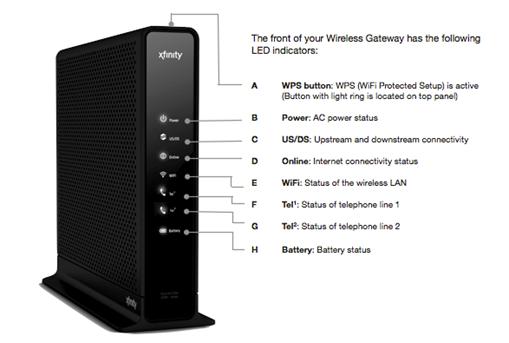
Xfinity has Wifi now!!!! If you have Xfinity call and ask for a upgrade. Ask them for the Wifi box. The cable guy will come set it up. Here is the link to the Xfinity Wifi:http://www.comcast.com/wifi/default.htm?SCRedirect=true Here is the parts of the Wifi box:
The new Windows logo
Microsoft has made a new Windows logo for Windows 8. Microsoft may changed the old logo on the other versions of Microsoft Windows. The full verson of Windows 8 will come out in October 26 2012! Here is the new Windows 8 logo:

Tuesday, June 26, 2012
The future computers build by Microsoft.
The future computers are coming! The are build by Microsoft! It is called Microsoft Surface. The Os (operating system) the Microsoft Surface will run on will be Windows 8. Watch the video blow to see more about the new computers! And look at the pictures. Here is the link to the future computers Microsoft is bulding: http://www.microsoft.com/surface/en/us/default.aspx Here is the video:
Here is the Pictures:
Subscribe to:
Posts (Atom)